In traditional networking, we used to have VLAN as the Layer
2 forwarding domain which also define the broadcast domain. Whereas in ACI,
Vlan are just an identifier and doesn’t defines the L2 domain. Bride domain defines the broadcast and L2 domain in ACI.
2 forwarding domain which also define the broadcast domain. Whereas in ACI,
Vlan are just an identifier and doesn’t defines the L2 domain. Bride domain defines the broadcast and L2 domain in ACI.
Like Vlan SVI in traditional network, subnets can also be
defined in BD. We can also define more than one subnet under BD.
defined in BD. We can also define more than one subnet under BD.
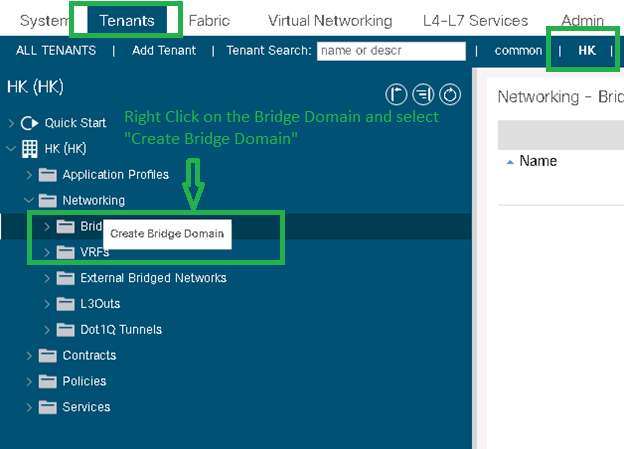
1. Go to TENANT => HK TENANT=>Right click on
BRIDGE DOMAIN => Select “CREATE BRIDGE DOMAIN”.
BRIDGE DOMAIN => Select “CREATE BRIDGE DOMAIN”.

2. Name BD and map the VRF to this BD. Press NEXT
to proceed.

3. Configure the L3 parameters and Click + to
configure the subnet information under BD.
configure the subnet information under BD.

4. Enter the BD IP address with subnet mask. Check the
“MAKE THIS IP ADDRESS PRIMARY”.
“MAKE THIS IP ADDRESS PRIMARY”.
Private to VRF—Subnet remains local to the VRF and Tenant.
Advertised Externally—Subnet can be advertised out of ACI Fabric over L3
out.
out.
Shared between VRFs—Subnet can be exported to other VRFs in case inter-VRF
routing is required.
routing is required.
“Treat as Virtual IP Address” option is only checked in case of multiple Fabrics.

5. You can see subnet details will be displayed in
L3 configuration section. Click NEXT to Proceed.

6. Click
Finish to create the BD
