Below is the OSPF configuration example on Nexus
switches. Here OSPF is enable on the directly connected interface between 7K
switches.
switches. Here OSPF is enable on the directly connected interface between 7K
switches.
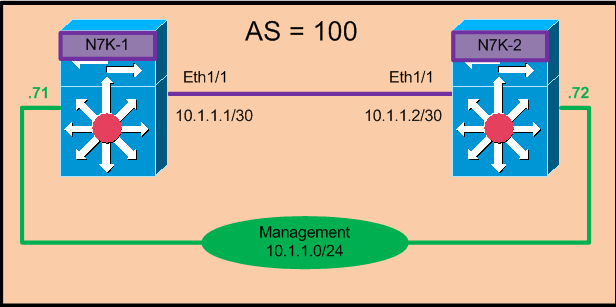
N7K-1:-
Step 1:-
Enable OSPF feature
Enable OSPF feature
|
N7K-1(config)# feature ospf
|
Step 2:- Enable OSPF Process
|
N7K-1(config)# router ospf 10 –<<<<
OSPF process ID
N7K-1(config-router)# router-id 10.1.1.1
|
Step 3:-
Enable ospf on particular
interface
Enable ospf on particular
interface
|
N7K-12-1(config-router)# int Eth1/1
N7K-2(config-if)#ip address 10.1.1.1 255.255.255.252
N7K-12-1(config-if)# ip router ospf 100 area 0
|
N7K-2:-
Step 4 :- Enable OSPF feature
|
N7K-2(config)# feature ospf
|
Step 5:- Enable OSPF Process
|
N7K-2(config)# router ospf 100 –<<<<
OSPF process ID
N7K-2(config-router)# router-id 10.1.1.2
|
Step 6:-
Enable ospf on particular
interface.
Enable ospf on particular
interface.
|
N7K-2(config)# int Eth1/1
N7K-2(config-if)#ip address 10.1.1.2 255.255.255.252
N7K-2(config-if)# ip router ospf 100 area 0
|
Step 7 :- Optional- Below command can be used if we want
to disable the neighborship on particular interface.
to disable the neighborship on particular interface.
|
N7K-1(config)# int Eth1/1
N7K-1(config-if)# ip ospf 100 passive-interface —< To disable neighborship but still
advertise the network
N7K-1(config-if)# ip ospf network point-to-point –<< To change the network type
|
Verification :-
A. Show ip ospf
neighbor
neighbor
|
N7K-1# sh ip ospf neighbors
OSPF Process ID
100 VRF default
Total number of
neighbors: 1
Neighbor ID Pri State Up Time Address Interface
100.1.1.2 1 FULL/ – 00:00:08 100.1.1.2 Eth1/1
|