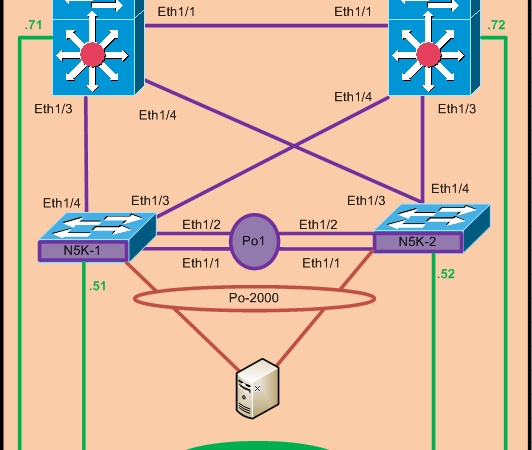
Below is the VPC+ configuration example.
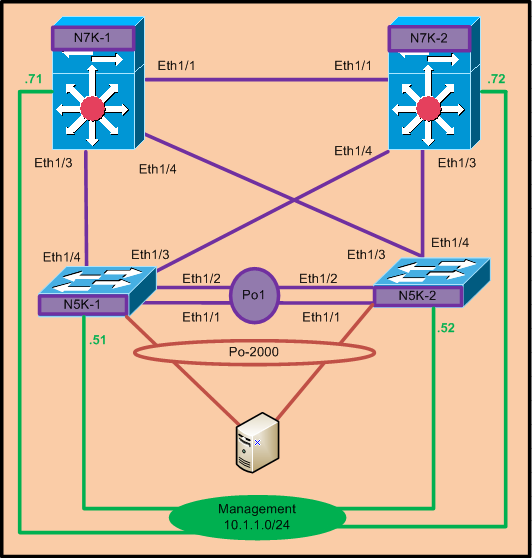
VPC+ is configured between N5k-1 and N5k-2 where fabric
path is configured on the VPC peer-link. We assume that Teaming is properly
configured on the server end and hence only switch side configuration is
demonstrated here.
path is configured on the VPC peer-link. We assume that Teaming is properly
configured on the server end and hence only switch side configuration is
demonstrated here.
N7K-1:-
Install feature-set fabricpath //–<<<< It must be executed in Default or
Admin VDC //
Admin VDC //
feature-set fabricpath
feature lacp
fabricpath switch-id 71 //–<<
To configure Static switch-id otherwise it will be dynamically assigned//
To configure Static switch-id otherwise it will be dynamically assigned//
vlan 100
mode fabricpath
interface Ethernet1/1
switchport mode
fabricpath
fabricpath
interface Ethernet1/3
switchport mode
fabricpath
fabricpath
interface Ethernet1/4
switchport mode
fabricpath
fabricpath
N7K-2 :-
Install feature-set fabricpath
feature-set fabricpath
feature lacp
fabricpath switch-id 72
vlan 100
mode fabricpath
interface Ethernet1/1
switchport mode
fabricpath
fabricpath
interface Ethernet1/3
switchport mode
fabricpath
fabricpath
interface Ethernet1/4
switchport mode
fabricpath
fabricpath
N5K-1 :-
Install feature-set fabricpath
feature-set fabricpath
feature Lacp
feature vpc
fabricpath switch-id 51
vpc domain 100
peer-keepalive
destination 10.1.1.52
destination 10.1.1.52
fabricpath
switch-id 55 //—-<<<<<<<<<<<< Must
be configured for VPC+ //
switch-id 55 //—-<<<<<<<<<<<< Must
be configured for VPC+ //
vlan 100
mode fabricpath
interface Ethernet1/1
Channel-group 1
mode active
mode active
switchport mode
fabricpath
fabricpath
interface Ethernet1/2
Channel-group 1
mode active
mode active
switchport mode
fabricpath
fabricpath
interface port-channel1
switchport mode
fabricpath
fabricpath
VPC peer-link
interface Ethernet1/3
switchport mode
fabricpath
fabricpath
interface Ethernet1/4
switchport mode
fabricpath
fabricpath
interface Ethernet1/5
Channel-group 2000 mode active
switchport mode trunk
int po2000
switchport mode trunk
vpc 2000
no shut
N5K-2 :-
install feature-set fabricpath
feature-set fabricpath
feature lacp
feature vpc
fabricpath switch-id 52
vlan 100
mode fabricpath
vpc domain 100
peer-keepalive
destination 10.1.1.51
destination 10.1.1.51
fabricpath
switch-id 55
switch-id 55
Note:- If you missed to configure sub switch-id under VPC domain
then VPC peer-link will remain down.
then VPC peer-link will remain down.
interface Ethernet1/1
Channel-group 1 mode active
switchport mode
fabricpath
fabricpath
interface Ethernet1/2
Channel-group 1 mode active
switchport mode fabricpath
interface port-channel1
switchport mode
fabricpath
fabricpath
VPC peer-link
interface Ethernet1/3
switchport mode fabricpath
interface Ethernet1/4
switchport mode
fabricpath
fabricpath
interface Ethernet1/5
Channel-group 2000
mode active
mode active
switchport mode trunk
int po2000
switchport mode trunk
vpc 2000
no shut
Verification:-
1. Show fabricpath
switch-id
switch-id
|
N7K-1#
show fabricpath switch-id
FABRICPATH SWITCH-ID
TABLE
Legend:
‘*’ – this system
=========================================================================
SWITCH-ID SYSTEM-ID FLAGS STATE STATIC
EMULATED
———-+—————-+————+———–+——————–
51 0005.73bd.fabc Primary Confirmed Yes
No
52 0005.73bf.337c Primary Confirmed Yes
No
55 0005.73bd.fabc Primary Confirmed No
Yes
55 0005.73bf.337c Primary Confirmed No
Yes
*71 0026.980d.4143 Primary Confirmed Yes
No
72 0026.980d.3c43 Primary Confirmed Yes
No |
2. Show fabricpath
isis adjacency
isis adjacency
|
N7K-1#
show fabricpath isis adjacency
Fabricpath
IS-IS domain: default Fabricpath IS-IS adjacency database:
System
ID SNPA Level State Hold Time Interface
N5K-1 N/A 1 UP
00:00:28 Ethernet1/3
N5K-2 N/A 1
UP 00:00:26 Ethernet1/4
N7K-2 N/A 1 UP
00:00:28 Ethernet1/1 |
3. Show vpc brief
|
N5K
-2(config-if)# show vpc brief
Legend:
(*) – local vPC is down,
forwarding via vPC peer-link
vPC
domain id : 100
vPC+
switch id : 55
Peer
status : peer adjacency formed ok
vPC
keep-alive status : peer is alive
vPC
fabricpath status : peer is reachable through fabricpath—<<<<<<
Configuration
consistency status: success
Per-vlan
consistency status : success
Type-2
consistency status : success
vPC
role : secondary
Number
of vPCs configured : 1
Peer
Gateway : Disabled
Dual-active
excluded VLANs : –
Graceful
Consistency Check : Enabled
vPC
Peer-link status
———————————————————————
id Port
Status Active vlans
— —-
—— ————————————————–
1 Po1
up 100
vPC
status
—————————————————————————
id Port Status Consistency Reason Active vlans vPC+ Attrib
— ———- —— ———– —— ———— ———–
2000 Po2000 up
success success 100 DF: Partial |