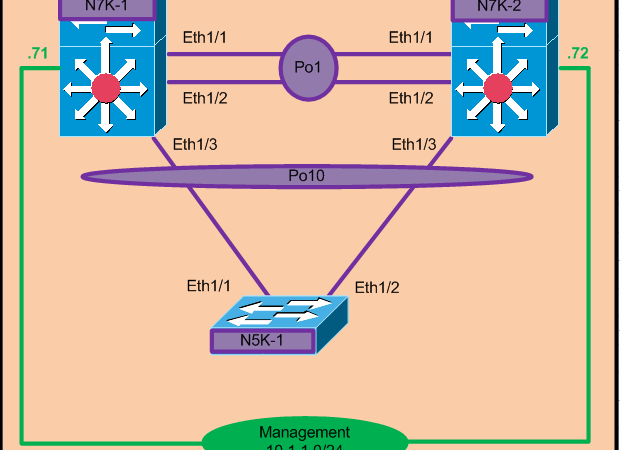
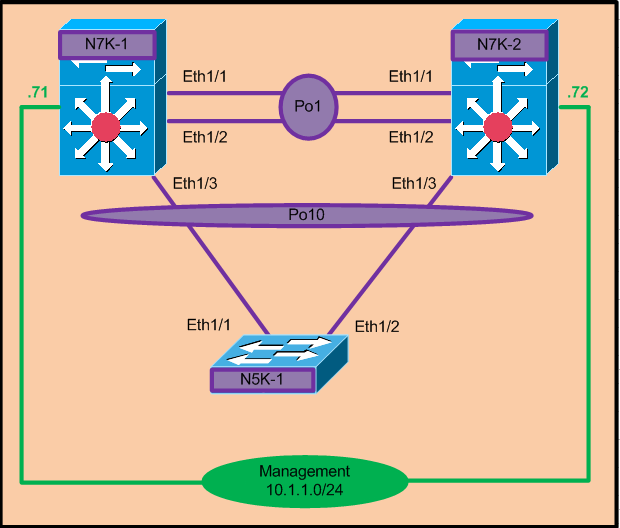
Below is the single side VPC configuration example. In the below example 7Ks are configured in VPC so that downstream switch i.e 5K will believe that it is connected to only one upstream switch.
Note:- VPC configuration will only be done on the 7Ks not on the 5K as for 5K it is just a normal port channel.
As we know to create VPC we need two type of connectivity as mentioned below:-
1.VPC peer-link
VPC peer-link can only be configured on the layer-2 port-channel containing Ten-gig links. It cannot be configured on physical interfaces. For complete redundancy we should chose interfaces from different modules and must contain more than one interface.
VPC peer-link command is used to convert the port-channel to peer-link.
2.VPC peer-keepalive link
VPC peer-keepalive link is a L3 interface and it is just a backup to the peer-link but it will not pass any user traffic. Only hello packets are exchange over keepalive link. There is no impact if the peer-keepalive link is down and peer-link is up.
VPC peer-keepalive link can be configured using management interface or any L3 interface in default or any other VRF. Cisco recommends to use a dedicated vrf for peer keepalaive link.
N7K-1:-
Step1:-
Enable Feature VPC
Enable Feature VPC
|
N7K-1(config)# feature vpc
|
Step 2:-
Enable Feature LACP
Enable Feature LACP
|
N7K-1(config)# feature lacp
|
Step 3:-
Create VPC domain. Make sure it is same on the VPC peer otherwise VPC will
remain in down state.
Create VPC domain. Make sure it is same on the VPC peer otherwise VPC will
remain in down state.
|
N7K-1(config-if-range)# vpc domain 100
N7K-1(config-vpc-domain)# peer-keepalive destination
10.1.1.72 –<< Mgmt IP of N7K-2
Note:
——–::
Management VRF will be used as the default VRF ::——– |
We get the below output if domain Id are different on
peers switches.
peers switches.
|
N7K-1(config)# show vpc brief
Legend:
(*) – local vPC is down, forwarding via vPC peer-link
vPC domain id : 100
Peer status : peer link not
configured
vPC keep-alive status : peer is alive, but domain IDs
do not match —–<<<<<<<<<<<<<<
Configuration consistency status : failed
Per-vlan consistency status : failed
Configuration inconsistency reason: vPC peer-link does
not exist
Type-2 consistency status : failed
Type-2 inconsistency reason : vPC peer-link does not exist
vPC role : none established
Number of vPCs configured : 0
Peer Gateway : Disabled
Dual-active excluded VLANs : –
Graceful Consistency Check : Disabled (due to peer
configuration)
Auto-recovery status : Disabled
|
We get below output when peer switches are reachable via
peer keepalive link.
peer keepalive link.
|
N7K-1(config-vpc-domain)# show vpc brief
Legend:
(*) – local vPC is down, forwarding via vPC peer-link
vPC domain id : 100
Peer status : peer link not configured –<<
vPC keep-alive status : peer is alive —–<<<
Configuration consistency status : failed
Per-vlan consistency status : failed
Configuration inconsistency reason: vPC peer-link does
not exist —<<<<<<<<<
Type-2 consistency status : failed
Type-2 inconsistency reason : vPC peer-link does not exist
vPC role : none established
Number of vPCs configured : 0
Peer Gateway : Disabled
Dual-active excluded VLANs : –
Graceful Consistency Check : Disabled (due to peer
configuration)
Auto-recovery status : Disabled
|
Step 4:-
Create port-channel for vpc peer-link. As soon as VPC PEER-LINK command is
configured on
Create port-channel for vpc peer-link. As soon as VPC PEER-LINK command is
configured on
port channel the port type is changed to network and
bridge assurance is enabled on the port-channel.
bridge assurance is enabled on the port-channel.
|
N7K-1(config)# int eth1/1-2
N7K-1(config-if-range)# channel-group 1 mode active
N7K-1(config-if-range)# no shut
N7K-1(config-if-range)# int po1
N7K-1(config-if)# switchport mode trunk
N7K-1(config-if)# vpc peer-link
Please note that spanning tree port type is changed to
“network” port type on vPC peer-link.
This will enable spanning tree Bridge Assurance on vPC
peer-link provided the STP Bridge Assurance
(which is enabled by default) is not disabled.
N7K-1(config-if)# no shut
|
Step 5:-
Configure port-channel connected to 5K.
Configure port-channel connected to 5K.
|
N7K-1(config)# int eth1/3
N7K-1(config-if-range)# channel-group 10 mode active
N7K-1(config-if-range)# no shut
N7K-1(config-if-range)# int po10
N7K-1(config-if)# switchport mode trunk
N7K-1(config-if)#vpc10
|
N7K-2:-
Step 6:- Enable
vpc and lacp feature
vpc and lacp feature
|
N7K-2(config)# feature vpc
N7K-2(config)# feature lacp
|
Step7:-
Configure VPC Domain and vpc peer-keepalive link.
Configure VPC Domain and vpc peer-keepalive link.
|
N7K-2(config-if-range)# vpc domain 100
N7K-2(config-vpc-domain)# peer-keepalive destination
10.1.1.71 –<< Mgmt IP of N7K-1
Note:
——–::
Management VRF will be used as the default VRF ::——– |
Step8:-
Configure VPC peer-link
Configure VPC peer-link
|
N7K-2(config)# int eth1/1-2
N7K-2(config-if-range)# channel-group 1 mode active
N7K-2(config-if-range)# no shut
N7K-2(config-if-range)# int po1
N7K-2(config-if)# switchport mode trunk
N7K-2(config-if)# vpc peer-link
Please note that spanning tree port type is changed to
“network” port type on vPC peer-link.
This will enable spanning tree Bridge Assurance on vPC
peer-link provided the STP Bridge Assurance
(which is enabled by default) is not disabled.
N7K-2(config-if)# no shut
|
Step9:-
Configure vpc port-channel connected to N5k
Configure vpc port-channel connected to N5k
|
N7K-2(config)# int eth1/3
N7K-2(config-if-range)# channel-group 10 mode active
N7K-2(config-if-range)# no shut
N7K-2(config-if-range)# int po10
N7K-2(config-if)# switchport mode trunk
N7K-2(config-if)#vpc10
|
N5K-1:-
Step10:- Enable
LACP feature
LACP feature
|
N5K-1(config)# feature lacp
|
Step 11:-
Configure port-channel connected to 7Ks.
Configure port-channel connected to 7Ks.
|
N7K-2(config)# int eth1/1-2
N7K-2(config-if-range)# channel-group 1 mode active
N7K-2(config-if-range)# no shut
N7K-2(config-if-range)# int po1
N7K-2(config-if)# switchport mode trunk
|
Note: – There is no need to configure VPC on 5K. As for 5K
it just another port channel going to uplink switch.
it just another port channel going to uplink switch.
Verification:-
VPC peering is up when both side peer-link and keepalive
links are up as shown below.
links are up as shown below.
|
N7K-1(config-if)# show vpc brief
Legend:
(*) – local vPC is down, forwarding via vPC peer-link
vPC domain id : 100
Peer status : peer adjacency
formed ok
vPC keep-alive status : peer is alive
Configuration consistency status : success
Per-vlan consistency status : success
Type-2 inconsistency reason : Consistency Check Not Performed
vPC role : primary
Number of vPCs configured : 0
Peer Gateway
: Disabled
Dual-active excluded VLANs : –
Graceful Consistency Check : Enabled
Auto-recovery status : Disabled
vPC Peer-link status
———————————————————————
id Port Status Active vlans
— —- ——
————————————————–
1 Po1 up
1 |
VPC can be verified using show vpc role command. ROLE
PRIORITY command under VPC domain can be used to change the VPC role but bouncing
of VPC peer link is required to apply the new configured priority.
PRIORITY command under VPC domain can be used to change the VPC role but bouncing
of VPC peer link is required to apply the new configured priority.
|
N7K-1(config-if)# show vpc role
vPC Role status
—————————————————-
vPC role : primary
Dual Active Detection Status : 0
vPC system-mac : 00:23:04:ee:be:64
vPC system-priority : 32667
vPC local system-mac : 00:26:98:0d:3c:c4
vPC local role-priority : 32667
|
Below command can show the status of the peer-keepalive
link and its statistics.
link and its statistics.
|
N7K-1(config-if)# show vpc peer-keepalive
vPC keep-alive status : peer is alive
–Peer is alive for : (8525) seconds, (220) msec
–Send status : Success
–Last send at : 2014.12.19 17:55:30 978
ms
–Sent on interface : mgmt0
–Receive status : Success
–Last receive at : 2014.12.19 17:55:30 978 ms
–Received on interface : mgmt0
–Last update from peer : (0) seconds, (139) msec
vPC Keep-alive parameters
–Destination : 10.1.1.72
–Keepalive interval : 1000 msec
–Keepalive timeout : 5 seconds
–Keepalive hold timeout : 3 seconds
–Keepalive vrf : management
–Keepalive udp port : 3200
–Keepalive tos : 192
|
Below command shows the consistency check between the VPC
peers. Peer with Consistency type-1 are not allowed to make pair.
peers. Peer with Consistency type-1 are not allowed to make pair.
|
N7K-1(config-if)# show vpc consistency-parameters
global
Legend:
Type 1 :
vPC will be suspended in case of mismatch
Name Type Local Value Peer Value
————-
—- ———————- ———————–
STP Mode 1 Rapid-PVST Rapid-PVST
STP Disabled 1 None None
STP MST Region Name 1
“” “”
STP MST Region Revision 1
0 0
STP MST Region Instance to 1
VLAN Mapping
STP Loopguard 1 Disabled Disabled
STP Bridge Assurance 1
Enabled Enabled
STP Port Type, Edge
1 Normal, Disabled, Normal, Disabled,
BPDUFilter, Edge BPDUGuard Disabled Disabled
STP MST Simulate PVST 1
Enabled Enabled
Allowed VLANs – 1 1
Local suspended VLANs –
– – |
Particular vpc port-channel consistency parameter can
also been seen using below command.
also been seen using below command.
|
N7K.;-1(config-if)# show vpc consistency-parameters
interface po10
Legend:
Type 1 :
vPC will be suspended in case of mismatch
Name Type Local Value Peer Value
————- —- ———————-
———————–
STP Port Type 1 Default Default
STP Port Guard 1 None None
STP MST Simulate PVST 1
Default Default
lag-id 1 [(7f9b, [(7f9b,
0-23-4-ee-be-64,
800a, 0-23-4-ee-be-64, 800a,
0, 0), (8000, 0, 0), (8000,
0-5-73-ca-90-1, 13, 0, 0-5-73-ca-90-1, 13, 0,
0)] 0)]
mode 1 active active
Speed 1 10 Gb/s 10 Gb/s
Duplex 1 full full
Port Mode 1 trunk trunk
Native Vlan 1 1
1
MTU 1 1500
1500
Allowed VLANs –
1-4094 1-4094
Local suspended VLANs – –
– |
|
|