Latest posts
-
Host a website on Ubuntu on multiple ports
Below are the steps to host a website on multiple ports. In the below example 172.16.1.11 is the IP adddress on the Ubuntu server which will receive the customer traffic. STEP 1: Create a directory which will contain the HTML page of the website. Sudo Su mkdir /var/www/html/172.16.1.10_all STEP 2: Create the index html file and…
-
Host a website on Ubuntu on port 80
Below are the steps to host a website on port 80. In the below example 172.16.1.11 is the IP adddress on the Ubuntu server which will receive the customer traffic. STEP 1: Create a directory which will contain the HTML page of the website. Sudo Su mkdir /var/www/html/172.16.1.11_80 STEP 2: Create the index html file and…
-
Host Multiple Websites on a Single Server with Apache on Ubuntu
Below config is to host multiple website which runs on different port on same server:- Step1: Make two directories one for each port mkdir /var/www/html/172.16.1.12_8080 mkdir /var/www/html/172.16.1.12_8081 Step2: Create index file for site on port 8080 nano /var/www/html/172.16.1.12_8080/index.html <html> <title>172.16.1.12_8080</title> <h1>Welcome to 172.16.1.12_8080 Website</h1> <p>Website on port 8080</p> </html> CTRL X then press Y press…
-
Stuck in Configuration Utility restarting – Big IP
1. Log in to BIG-IP . 2. Make a backup using below command : /config/httpd/conf.d/proxy_ajp.conf cp /config/httpd/conf.d/proxy_ajp.conf /config/httpd/conf.d/proxy_ajp.conf.bk 3.Edit /config/httpd/conf.d/proxy_ajp.conf Below is the command to make the changes. After the command press “i” (insert) to enable the editing and once the changes are done, enter esc and type :wq!(write and quite). vi /config/httpd/conf.d/proxy_ajp.conf Locate the…
-
F5 default credentials and some interesting Facts.
Below are the default credentials for F5. you can change the credentials during initial setup wizard. Cli Username: root Password: default GUI Username:admin Password:admin Interesting Fact:- Root and admin username cannot be deleted from F5. BY default, username admin doesnot have access to the CLI but we can assign either advance shell or TMOS access…
-
Global NTP servers
NTP is a UDP based service which works on port number 123.It is recommended to use pool.ntp.org to find an NTP server. All zones in All Pool Servers. Africa — africa.pool.ntp.org Antarctica — antarctica.pool.ntp.org Asia — asia.pool.ntp.org Europe — europe.pool.ntp.org North America — north-america.pool.ntp.org Oceania — oceania.pool.ntp.org South America — south-america.pool.ntp.org Below is the command…
-
DNS root server list – A-M
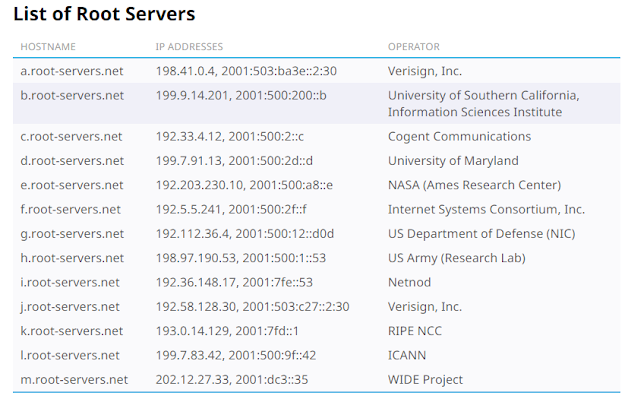
Below is the list of root servers starting from a to m.
-
SNMPv3 config on Cisco routers/Switches
1) Create an access-list to allow SNMP source servers. access-list 10 permit 10.10.10.10 access-list 10 permit 10.10.10.11 access-list 10 permit 10.10.10.12 All SNMP servers must be allowed in above ACLs. 2) Now, Create the new Group using below command. snmp-server group GROUP1 v3 auth read access 10 3) Create new credentials using the…
-
Enable Password vs Enable Secret command on cisco routers/switches
We all know that enable password is used to change from user mode to priviledge mode. Enable password command will configure the password in unencrypted form whereas Enable secret command encrypts the password using MD5 hashing algorithm. Enable secret command is always recommended. Secret password will take precedence over enable password command.
-
(No Title)
on point! thanks