Latest posts
-
External Route Summarization – OSPF
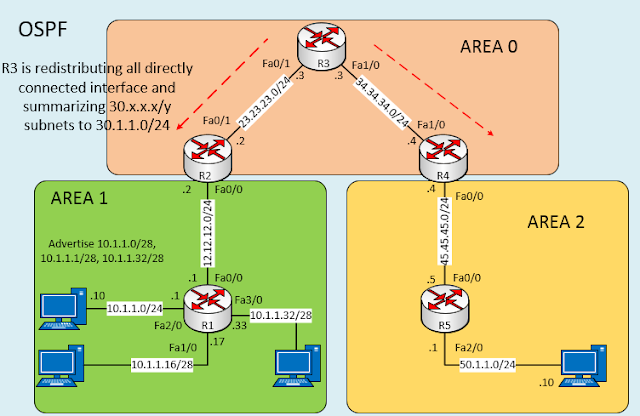
External route can only be summarized on ASBR only. R1:- interface Loopback0 ip address 1.1.1.1 255.255.255.255 interface FastEthernet0/0 description *** Connected to R2*** ip address 12.12.12.1 255.255.255.0 no shut interface FastEthernet1/0 description *** Connected to LAN1*** ip address 10.1.1.17 255.255.255.240 no shut interface FastEthernet2/0 description *** Connected to LAN2*** ip address 10.1.1.1 255.255.255.240 no shut…
-
Inter-Area Route Summarization – OSPF
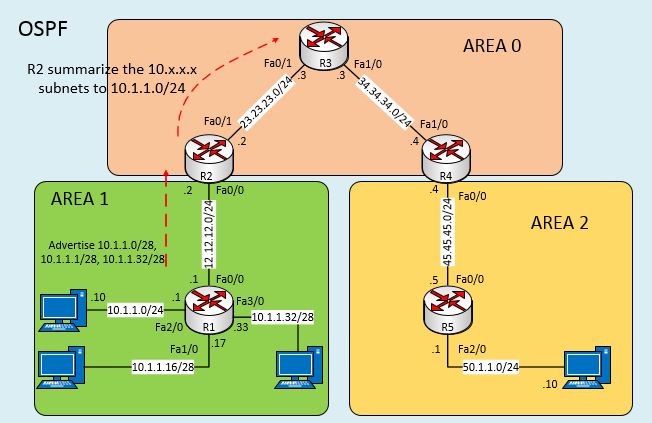
R1:- interface Loopback0 ip address 1.1.1.1 255.255.255.255 interface FastEthernet0/0 description *** Connected to R2*** ip address 12.12.12.1 255.255.255.0no shut interface FastEthernet1/0description *** Connected to LAN1*** ip address 10.1.1.17 255.255.255.240no shut interface FastEthernet2/0description *** Connected to LAN2*** ip address 10.1.1.1 255.255.255.240no shut interface FastEthernet3/0description *** Connected to LAN3*** ip address 10.1.1.33 255.255.255.240no shut router ospf 1 router-id 1.1.1.1 log-adjacency-changes network 1.1.1.1 0.0.0.0 area 1 network…
-
Route Filter using Route-map – EIGRP
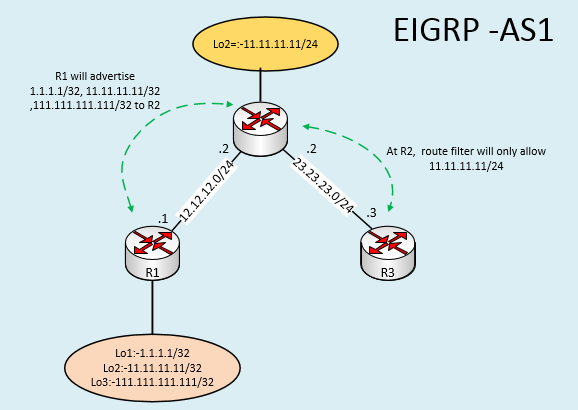
In order to filter routes in EIGRP update message we need to configure Distribute list under EIGRP process. Distribute list can be applied to all or specific interface. In below example we are applying distribution list on particular interface in order to filter route for particular neighbor. There are three ways by which we can…
-
Route Filter Using Prefix List – EIGRP
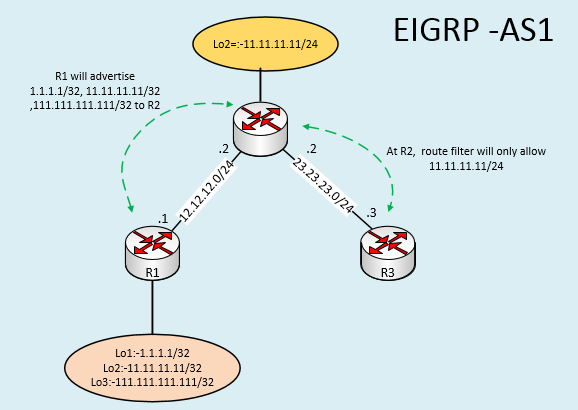
In order to filter routes in EIGRP update message we need to configure Distribute list under EIGRP process. Distribute list can be applied to all or specific interface. In below example we are applying distribution list on particular interface in order to filter route for particular neighbor. There are three ways by which we can…
-
Route Filtering using Access-list – EIGRP
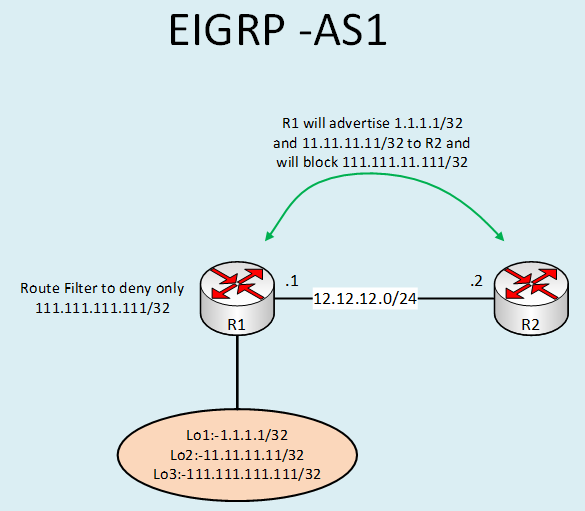
In order to filter routes in EIGRP update message we need to configure Distribute list under EIGRP process. Distribute list can be applied to all or specific interface. In below example we are applying distribution list on particular interface in order to filter route for particular neighbor. There are three ways by which we can…
-
Destination NAT configuration example
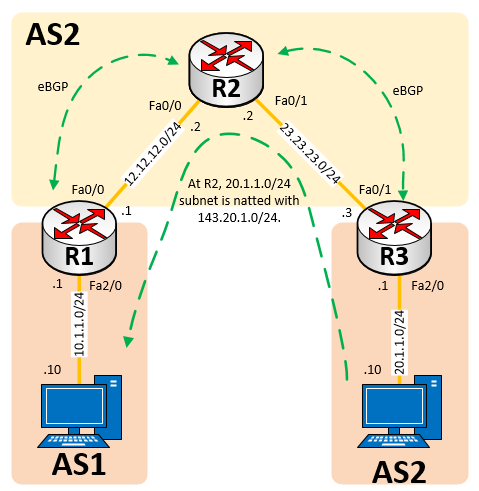
R1 :- interface FastEthernet0/0 description ” Connected to R2 “ ip address 12.12.12.1 255.255.255.0 no shut interface FastEthernet2/0 description ” Connected to PC1 “ ip address 10.1.1.1 255.255.255.0 no shut router bgp 1 no synchronization bgp log-neighbor-changes network 10.1.1.0 mask 255.255.255.0 neighbor 12.12.12.2 remote-as 2 no auto-summary ip route 143.20.1.0 255.255.255.0 12.12.12.2 R2 :- interface…
-
(No Title)
Nice article! ToR designs have a lot of advantages. Depending on the type of deployment the best place to put them is in the middle of the rack. This further reduces the total cable length and improves the airflow. IMHO The space utilized by the switch, is gained by not having to have a 48…
-
License requirement for IP sla on Cisco 2911
IP SLA configuration on Cisco 2911 require either security or Data License.
-
Community Filter configuration example – BGP
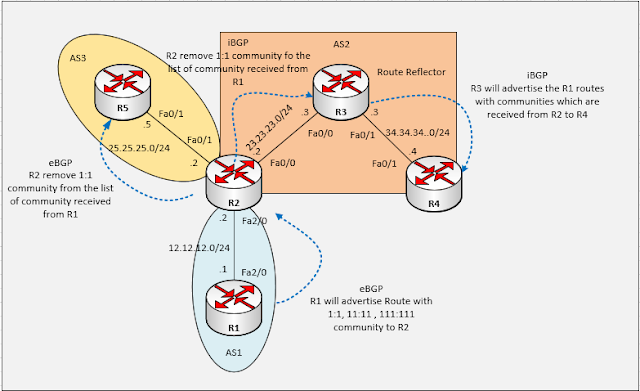
R1:- interface Loopback0 ip address 1.1.1.1 255.255.255.255 interface FastEthernet2/0 Description “ Connected to R2” ip address 12.12.12.1 255.255.255.0 no shut router bgp 1 no synchronization bgp log-neighbor-changes network 1.1.1.1 mask 255.255.255.255 neighbor 12.12.12.2 remote-as 2 neighbor 12.12.12.2 send-community both neighbor 12.12.12.2 route-map setCommunity out \Setting community value to all R1 Routes\ no auto-summary route-map setCommunity…
-
Additive community configuration example – BGP
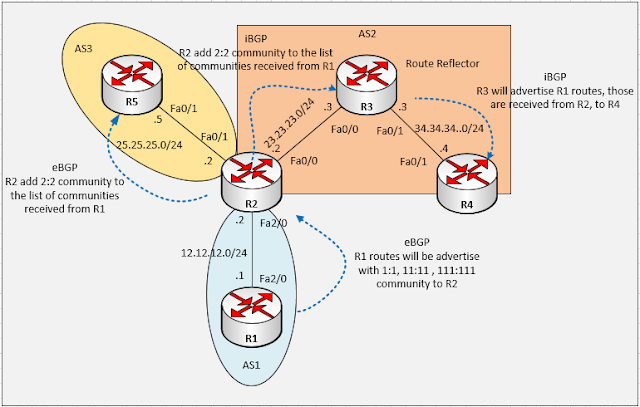
R1:- interface Loopback0 ip address 1.1.1.1 255.255.255.255 interface FastEthernet2/0 Description “ Connected to R2” ip address 12.12.12.1 255.255.255.0 no shut router bgp 1 no synchronization bgp log-neighbor-changes network 1.1.1.1 mask 255.255.255.255 neighbor 12.12.12.2 remote-as 2 neighbor 12.12.12.2 send-community both neighbor 12.12.12.2 route-map setCommunity out \Setting community value to all R1 Routes\ no auto-summary route-map setCommunity…