Latest posts
-
Requirement for RE-IP addressing of a site
In order to do re IP address of a site we need to get the below information so that we can plan our changes with less impact. List of network devices router,switches,wan optimizer etc.. List of security devices like firewall, load balancers , proxy devices etc.. List of wireless devices like WLC, MSE, APs etc.…
-
HSRP filtering in OTV
While using OTV we need to pay additional attention to the HSRP. As a best practice we don’t use the same HSRP VIP between the DCs. Each DCs should have their own HSRP pair and VIPs. Since OTV doesn’t block to the HSRP hello packet and mac learning by default. We need to block the…
-
Type of storage HBAs
HBAs (Host Bus Adapter) are just Nic cards for SAN that connects servers and storage to the SAN network. There are three types of HBAs:- A. Fibre channe HBAs :- It only supports native FC(fibre channel) traffic. It supports 1/2/4/8/16 Gbps. B. iSCSI HBAs :- It offloads CPU from iSCSI read and writes. It is…
-
F5 provisioning
Provisioning :—> A. To allocate F5 resources (like CPU and RAM) to the moduels. B. Introduced in version 10. C. If you have GTM and LTM modules. you need to perform provision for GTM whereas LTM is provisioned by default. Provision types:—>> A. Dedicated :- If there is only one module is used and hence…
-
F5 Licensing methods – Automatic and Manual
Licensing methods:- Automatic : – When BIG-IP has the direct internet access. Always store the license file in correct or appropiate directory. Manual:- when there is a firewall between BIP -IP and licensing server located in internet. And BIG-IP does’t have direct internet excess. Manual Licensing process:- A. Form the BIG-IP web configuration utility, copy…
-
F5 setup methods and tools
Setup methods and tools :– 1. SSH client :- To access the F5 remotely..Putty is recommended. 2. Serial terminal clients :- to get the console access. Teraterm is recommended with default settings 3. BIG-IP config Script :- to configure management IP and other network parameters 4. BIG-IP web-based configuration utility :- Used to configure licensing…
-
F5 port types
Below are the types of ports available in F5.. 1. Mgmt Port:– Has a default IP address 198.168.1.45/24 but no default gateway is configured by default. We need to re IP it during initial setup as per our network. 2.USB port :-…
-
New Management User creation in Cisco WLC
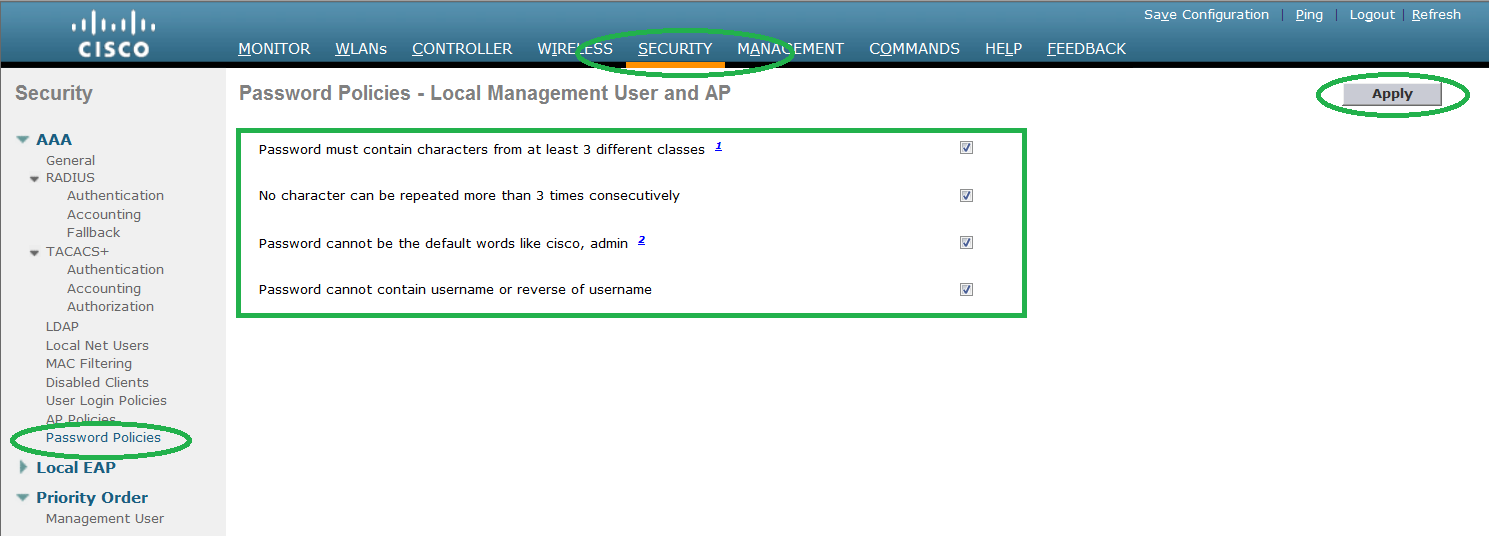
Follow the below setup to configure the new management user in Cisco WLC. Step 1. Before creating the user, check the password policies. It will be in use when you configure the password for the user. Step 2. To add new management user, go to MANAGEMENT -> LOCAL MANAGEMENT USERS -> Click NEW. Step 3.…
-
Downloading Customized Guest Web login page certificate in Cisco WLC
This Document explains step by step procedure to upload Web login page certificate used for web authentication login page. Step 1. Please test the reachability of FTP server from WLC. (Cisco Controller) >ping 192.168.1.10 Send count=3, Receive count=3 from 192.168.1.10 If there is any firewall in between controller and FTP server, please open the…
-
Customized Guest Web login page in Cisco WLC
This Document explains step by step procedure to upload Web login page used for web authentication. All WLCs has a default cisco login page. This method is used to upload the customised login page for web authentication. 1. Before proceeding to upgrade process, please make sure that you take back up of configuration and license…