Latest posts
-
Python for network engineer :- SSH to Cisco router using Python2.7
Below script can be used to access the device using SSH and capture show ip int brief command output. import paramiko #–<< import Paramiko library ssh = paramiko.SSHClient() ssh.set_missing_host_key_policy(paramiko.AutoAddPolicy()) # –<< to add host key ssh.connect(‘192.168.1.100′, port=22, username=’test’, password=’test’)–<< Device IP address, ssh port , username and password of the device) stdin,stdout,stderr=ssh.exec_command(‘show ip int brief’) output=stdout.readlines()…
-
Python for network engineer:- Telnet to Cisco router using Python
Below script can be used to telnet Cisco router using Python script and can capture show version output. import telnetlib # –<< importing telnet library user = “test” #–<< username configured in router password = “test” #–<<Password configured in router HOST = “192.168.1.100” #–<<IP address of the router telnet = telnetlib.Telnet(HOST) telnet.read_until(“Username: “) # –<<Reading username…
-
Errno 10060 – SSH paramiko error
Traceback (most recent call last): File “D:pythonSSH.py”, line 3, in <module> ssh.connect(‘192.168.1.100′, port=22, username=’test’ , password=’test’) File “C:Python27libsite-packagesparamikoclient.py”, line 310, in connect retry_on_signal(lambda: sock.connect(addr)) File “C:Python27libsite-packagesparamikoutil.py”, line 276, in retry_on_signal return function() File “C:Python27libsite-packagesparamikoclient.py”, line 310, in <lambda> retry_on_signal(lambda: sock.connect(addr)) File “C:Python27libsocket.py”,…
-
How to install Paramiko – Python
Make sure machine have direct internet access. 1. Go to Python27 folder. C:>cd Python27 C:Python27>dir Volume in drive C is Windows Volume Serial Number is 7A6A-22DB Directory of C:Python27 09/07/2017 04:08 PM <DIR> . 09/07/2017 04:08 PM <DIR> .. 09/07/2017 04:08 PM <DIR> …
-
(No Title)
Good post
-
Benefits of segment Routing
Benefits of segment Routing are as follows:- 1. SDN ready a) Foundation for Application engineered routing( AER) b) Can provide strict performance guarantees c) Efficient use of network resources d) Router can inject traffic with the segment list without any additional need of…
-
Segment Routing – Important Points
Segment Routing is the new generation source based routing and simplified version of MPLS. Instead of using label for each prefix, segment routing are identifying the segments. Below are few important points about segment routing. Segment Routing – Important Points 1. Flexible and simple version of MPLS 2. Scalable 3. Source Choose the path- Source…
-
PFR version 1 Vs 2 Vs 3
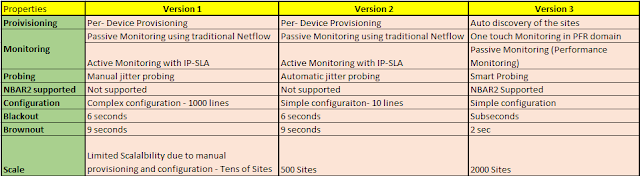
PFR stands for performance routing which is the building block for the iWAN. Intelligent WAN can reroute traffic not only based on the link up/down but also based on the performance of the link. You can route traffic based on application based performance as well. Below is the difference between PFR version 1, 2 and…
-
APIC to factory default reset configuration
Login to APIC using admin credentials apic1:~> eraseconfig setup
-
Blackout Vs Brownout network failure
Blackout:- When the data plane is down whereas the control plan is up. Routing protocol neighborship is establish but for some reason, like routing loop issues, source is not able to reach the destinations. Brownout:- High packet loss in the path or very high latency WAN issues.