Latest posts
-
Python for network engineer: cisco device backup using SSH : python2.7
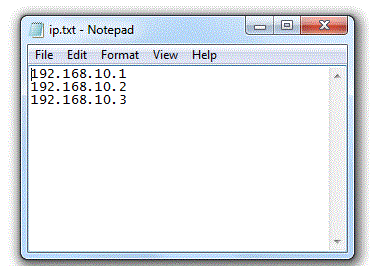
Below script will take the backup of cisco devices in the folder where you have stored your python script. Please make sure ip.txt file(which contains router IP address) is also in same folder. Below is the sample ip.txt file. import paramiko import time import datetime ssh1 = paramiko.SSHClient() ssh1.set_missing_host_key_policy(paramiko.AutoAddPolicy()) now = datetime.datetime.now() #open file in…
-
Python for network Engineer:- SSH to cisco router and run multiple commands :- python2.7
import paramiko import time #from getpass import getpass ssh = paramiko.SSHClient() ssh.set_missing_host_key_policy(paramiko.AutoAddPolicy()) ssh.connect(‘192.168.10.1′, username=’test’, password=’test’) ssh = ssh.invoke_shell() ssh.send(“show ip int briefn”) time.sleep(1) output = ssh.recv(65535) print output time.sleep(5) ssh.send(“sh vern”) time.sleep(1) output = ssh.recv(65535) print output
-
How to remove rows with specific text from the notepad using python 2.7
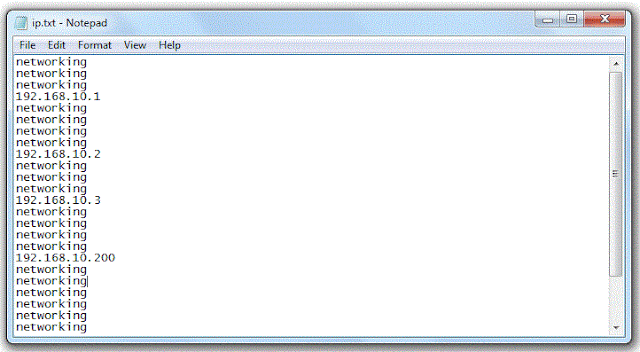
Below script is used to remove specific text from notepad. Below script is used to remove specific text from the notepad using python. To demonstrate the same we have used a file which has “networking” word in the file. #open the file in read mode which you need to modify, we have used ip.txt file. file= open(“ip.txt”,”r”)…
-
How to remove empty rows from notepad using Python 2.7
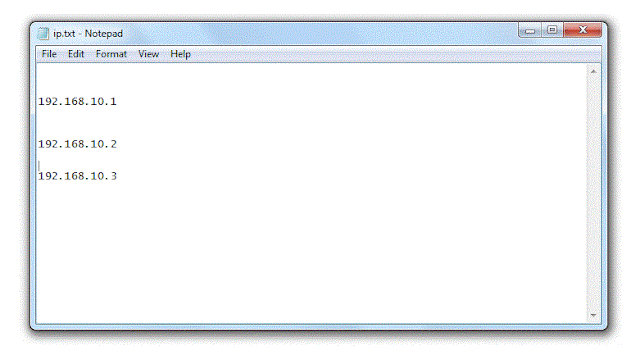
Below script is used to remove empty rows from notepad. #open the file in read mode which you need to modify, we have used ip.txt file. file= open(“ip.txt”,”r”) # Read the file lines = file.readlines() # close the file file.close() # Read the file in write mode file = open(“ip.txt”,”w”) # Reading each line and…
-
Python for network engineer :- RUN ping test to a destination from multiple routers using Python2.7
Below script is used to run ping test to a destination from all routers. e.g ip.txt must in same folder where you are storing you python program. Note:- Make sure router IP must be reachable from the machine where python script is configured. File used in the scripts are :- import telnetlib import time user…
-
Python for network engineer :- RUN ping test to a destination from multiple routers using Python2.7
Below script is used to run ping test to a destination from all routers. e.g ip.txt must in same folder where you are storing you python program. Note:- Make sure router IP must be reachable from the machine where python script is configured. File used in the scripts are :- import telnetlib import time user…
-
Python for network engineer :- Cisco router config backup using Python2.7
Below script is used to take backup of multiple devices. Make sure when you call a file in python then that file must be stored in same folder where you are storing your python script. e.g both ip.txt must in same folder where you are storing you python program. Note:- Make sure router IP must…
-
Python for network engineer :- Configure multiple router using telnet :-python 2.7
Below script is used to configure multiple devices. In below script ACL needs to be applied to multiple routers. Both Router IP and configuration are stored in different files Make sure when you call a file in python then that file must be stored in same folder where you are storing your python script. e.g…
-
Python file modes
The modes are: ‘r’ – Only to read a file. ‘w’ – Used to edit and write new information to the file. ‘a’ – Appending mode:- Used to add new data in existing file. ‘r+’ – Special read and write mode, When need to perform both read and write functions to the file.
-
Python for network engineer:- Configure Cisco router using Python2.7
We tried to configure loopback0 on the router using python. Same script can be used to configure anything on the router. We just need to add telnet.write command to configure the cisco router. import telnetlib user = “test” password = “test” HOST = “192.168.1.100” telnet = telnetlib.Telnet(HOST) telnet.read_until(“Username: “) telnet.write(user + “n”) telnet.read_until(“Password: “) telnet.write(password…