Latest posts
-
Inter AS Option B – MPLS
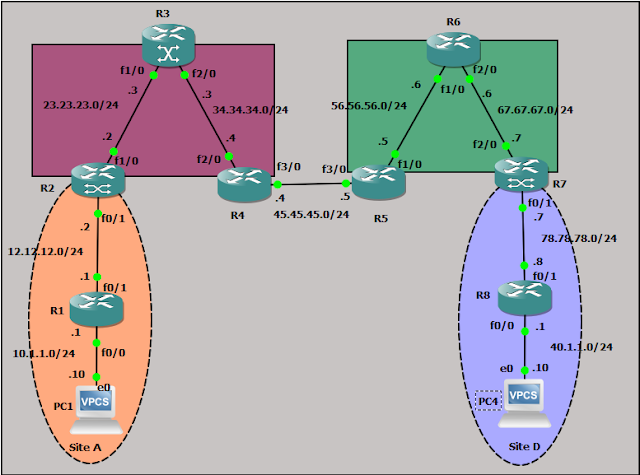
PC1:- PC1> show ip NAME : PC1[1] IP/MASK : 10.1.1.10/24 GATEWAY : 10.1.1.1 DNS : MAC : 00:50:79:66:68:00 LPORT : 10000 RHOST:PORT : 127.0.0.1:10001 MTU: : 1500 R1:- interface Loopback0 ip address 1.1.1.1 255.255.255.255 interface FastEthernet0/0 description *** Connected to PC1*** ip address 10.1.1.1 255.255.255.0 duplex auto speed auto interface FastEthernet0/1 description *** Connected…
-
Inter-AS option A – MPLS
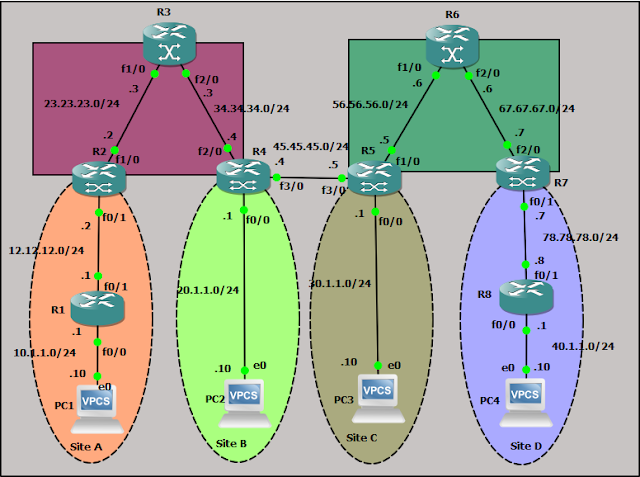
PC1:- PC1> show ip NAME : PC1[1] IP/MASK : 10.1.1.10/24 GATEWAY : 10.1.1.1 DNS : MAC : 00:50:79:66:68:00 LPORT : 10000 RHOST:PORT : 127.0.0.1:10001 MTU: : 1500 R1:- interface Loopback0 ip address 1.1.1.1 255.255.255.255 interface FastEthernet0/0 description *** Connected to PC1*** ip address 10.1.1.1 255.255.255.0 duplex auto speed auto interface FastEthernet0/1 description *** Connected to…
-
(No Title)
explanation done in a very simple manner . great . appreciate for the same
-
OSPF as PE-Ce protocol-Sham Link- MPLs
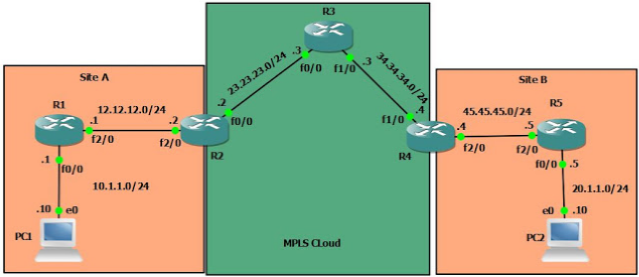
PC1:- PC1> ip 10.1.1.10 255.255.255.0 10.1.1.1 Checking for duplicate address… PC1 : 10.1.1.10 255.255.255.0 gateway 10.1.1.1 R1:- R1(config)#int fa0/0 R1(config-if)#ip add 10.1.1.1 255.255.255.0 R1(config-if)#no shut R1(config-if)#int fa2/0 R1(config-if)#ip add 12.12.12.1 255.255.255.0 R1(config-if)#no shut R1(config-if)#int lo0 R1(config-if)#ip add 1.1.1.1 255.255.255.255 R1(config)#router ospf 1 R1(config-router)# log-adjacency-changes R1(config-router)# network 1.1.1.1 0.0.0.0 area 0 R1(config-router)# network 10.1.1.1 0.0.0.0 area…
-
OSPF as PE-CE protocol with different Domain-id – MPLS
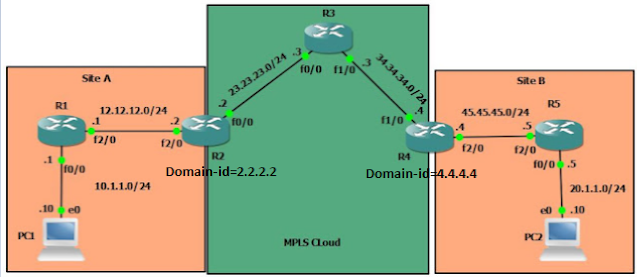
PC1:- PC1> ip 10.1.1.10 255.255.255.0 10.1.1.1 Checking for duplicate address… PC1 : 10.1.1.10 255.255.255.0 gateway 10.1.1.1 R1:- R1(config)#int fa0/0 R1(config-if)#ip add 10.1.1.1 255.255.255.0 R1(config-if)#no shut R1(config-if)#int fa2/0 R1(config-if)#ip add 12.12.12.1 255.255.255.0 R1(config-if)#no shut R1(config-if)#int lo0 R1(config-if)#ip add 1.1.1.1 255.255.255.255 R1(config)#router ospf 1 R1(config-router)# log-adjacency-changes R1(config-router)# network 1.1.1.1 0.0.0.0 area 0 R1(config-router)# network 10.1.1.1 0.0.0.0 area…
-
OSPF as PE-CE Protocol – With no area 0 – MPLS
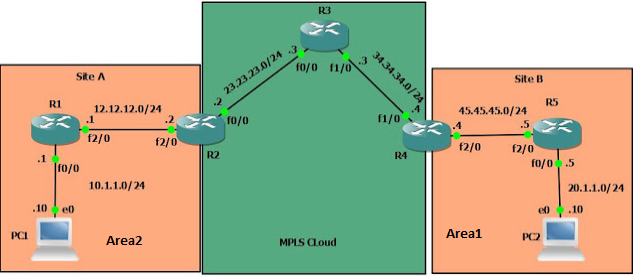
PC1:- PC1> ip 10.1.1.10 255.255.255.0 10.1.1.1 Checking for duplicate address… PC1 : 10.1.1.10 255.255.255.0 gateway 10.1.1.1 R1:- R1(config)#int fa0/0 R1(config-if)#ip add 10.1.1.1 255.255.255.0 R1(config-if)#no shut R1(config-if)#int fa2/0 R1(config-if)#ip add 12.12.12.1 255.255.255.0 R1(config-if)#no shut R1(config-if)#int lo0 R1(config-if)#ip add 1.1.1.1 255.255.255.255 R1(config)#router ospf 1 R1(config-router)# log-adjacency-changes R1(config-router)# network 1.1.1.1 0.0.0.0 area 2 R1(config-router)# network 10.1.1.1 0.0.0.0 area…
-
OSPF as PE-CE protocol- MPLS – Different area ( area 0 and area 1)
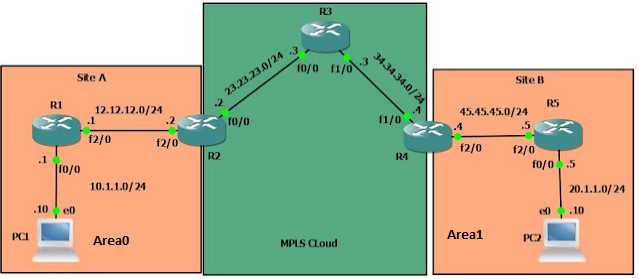
PC1:- PC1> ip 10.1.1.10 255.255.255.0 10.1.1.1 Checking for duplicate address… PC1 : 10.1.1.10 255.255.255.0 gateway 10.1.1.1 R1:- R1(config)#int fa0/0 R1(config-if)#ip add 10.1.1.1 255.255.255.0 R1(config-if)#no shut R1(config-if)#int fa2/0 R1(config-if)#ip add 12.12.12.1 255.255.255.0 R1(config-if)#no shut R1(config-if)#int lo0 R1(config-if)#ip add 1.1.1.1 255.255.255.255 R1(config)#router ospf 1 R1(config-router)# log-adjacency-changes R1(config-router)# network 1.1.1.1 0.0.0.0 area 0 R1(config-router)# network 10.1.1.1 0.0.0.0 area…
-
%OSPF-4-ERRRCV: Received invalid packet: mismatch area ID, from backbone area must be virtual-link but not found from
If you receive below error then please check network command and make sure that same area is configured on both end. %OSPF-4-ERRRCV: Received invalid packet: mismatch area ID, from backbone area must be virtual-link but not found from
-
%VRF specified does not match existing router
Error “%VRF specified does not match existing router” suggest that you have already configured an OSPF process for particular VRF. R2(config-router)#router ospf 1 vrf cust1 %VRF specified does not match existing router R# do sh run | sec ospf router ospf 100 vrf cust1 –<<< redistribute bgp 1 subnets network 12.12.12.2 0.0.0.0 area 0
-
%ERROR: AS(1) in use by classic router
Check the other EIGRP process configured on the device. May be it is already configured.