Port-profile is the way to configure the configuration
template and to apply configuration on the multiple interfaces at the same
time.
template and to apply configuration on the multiple interfaces at the same
time.
The entire configuration is done under port-profile and
it gets replicated on the interfaces as soon as port-profile is mapped to the
interface. All the configuration changes in port-profile will be replicated in the
interface. It is not an initial template but an updating template which always
attached to the interface.
it gets replicated on the interfaces as soon as port-profile is mapped to the
interface. All the configuration changes in port-profile will be replicated in the
interface. It is not an initial template but an updating template which always
attached to the interface.
Port-profile is used when the same configuration needs to
be done on many interfaces.
be done on many interfaces.
There are below types of Port-profiles:-
- Ethernet:
– It is used when port-profile applied on the physical interfaces. - Port-channel:-
Used in case of port-channel - Interface-vlan:
– When port-profile is applied on the SVI.
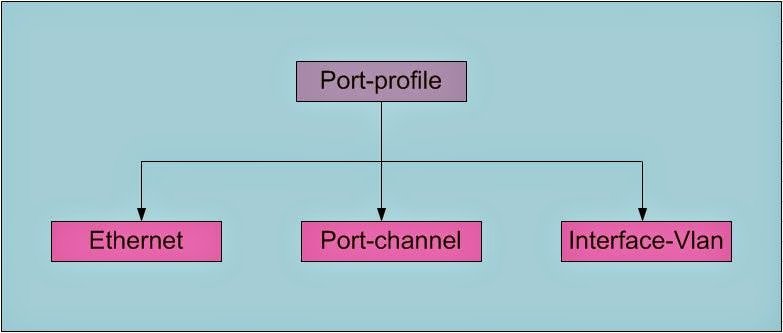
Below is the process used to configure and apply the
port-profiles:-
Step1. Create
the port-profile based on the type of interface it is getting mapped. There are
four types of port-profile like Ethernet, interface-vlan, port-channel and
tunnel-te.
the port-profile based on the type of interface it is getting mapped. There are
four types of port-profile like Ethernet, interface-vlan, port-channel and
tunnel-te.
Note:- Ethernet
is the default port-profile.
is the default port-profile.
|
N7K-1(config)# port-profile type ?
ethernet Ethernet type ———-<<<<<<
Default interface-vlan Interface-vlan type port-channel Port-channel type
tunnel-te Tunnel-te type
N7K-1(config)# port-profile test
N7K-1# sh run port-profile test
!Command: show running-config port-profile test
!Time: Wed Sep 17 18:46:58 2014
version 5.2(1)
port-profile type ethernet test ————<<<<<<Default
|
Step2. Configure
the port-profile as per the requirement.
the port-profile as per the requirement.
Note: – Please keep in mind port-profile name is case
sensitive. It can be seen that same name with different case, will create two
different port-profiles.
sensitive. It can be seen that same name with different case, will create two
different port-profiles.
|
N7K-1(config)# port-profile type ethernet Access_PORT
N7K-1(config-port-prof)# switchport mode access
N7K-1(config-port-prof)# switchport access vlan 100
N7K-1(config-port-prof)# spanning-tree port type
edge
N7K-1(config)# port-profile type ethernet ACCESS_PORT
N7K-1(config-port-prof)# switchport
N7K-1(config-port-prof)# switchport mode access
N7K-1(config-port-prof)# switchport access vlan 100
N7K-1(config-port-prof)# spanning-tree port type edge
N7K-1(config)# sh run port-profile
!Command: show running-config port-profile
!Time: Wed Sep 17 16:49:36 2014
version 5.2(1)
port-profile type ethernet Access_PORT
switchport
switchport mode
access
switchport
access vlan 100
spanning-tree
port type edge
port-profile type ethernet ACCESS_PORT
switchport
switchport mode
access
switchport
access vlan 100
spanning-tree
port type edge |
Step 3. Verify
the port-profile configuration.
the port-profile configuration.
|
N7K-1(config)# sh run port-profile
port-profile type ethernet ACCESS_PORT
switchport
switchport mode
access
switchport
access vlan 100
spanning-tree
port type edge |
Step4. Once
the configuration verification is done, enable the port profile.
the configuration verification is done, enable the port profile.
|
N7K-1(config)# port-profile type ethernet
ACCESS_PORT
N7K-1(config-port-prof)# state enabled
N7K-1(config-port-prof)# exit
|
Step5. Apply
port-profile on the physical interface which inherits the configuration of
port-profile.
port-profile on the physical interface which inherits the configuration of
port-profile.
|
N7K-1(config)#Interface Eth1/1
N7K-1(config)#inherit port-profile ACCESS_PORT
|
|
N7K-1(config)# int eth1/21
N7K-1(config-if)# inherit port-profile access_port
ERROR: No profile matching given profile name
– – – <<This error is encountered when the port-profile name give is not correct or with different case. |
Step6. Show run interface command will not show the
complete switchport configuration as shown below.
complete switchport configuration as shown below.
|
N7K-1(config)# sh run int eth1/21
!Command: show running-config interface Ethernet1/21
!Time: Wed Sep 17 16:51:12 2014
version 5.2(1)
interface Ethernet1/21
inherit
port-profile ACCESS_PORT |
Use the below command to check the entire configuration
associated to the switchport:-
associated to the switchport:-
|
N7K-1(config)# sh port-profile expand-interface name
ACCESS_PORT
port-profile ACCESS_PORT
Ethernet1/21
switchport
switchport mode
access
switchport
access vlan 100
spanning-tree
port type edge |
Step7. Below command can be used to find what all interfaces
as well as configuration associated to the port-profiles.
as well as configuration associated to the port-profiles.
|
N7K-1# show port-profile name ACCESS_PORT
port-profile ACCESS_PORT
type: Ethernet
description:
status: enabled
max-ports: 512 ———————–<<<<<<<<<<<<<<
inherit:
config
attributes: ————<<<<<<<<<<<<<<<<<<<<<
switchport
switchport mode
access
switchport
access vlan 100
spanning-tree
port type edge
evaluated config
attributes:
switchport
switchport mode
access
switchport
access vlan 100
spanning-tree
port type edge
assigned
interfaces:
Ethernet1/21 ——————<<<<<<<<<<<<<<<<<<<<
|
Step8. Configuration
done on the interface will take preference over the port-profile.
done on the interface will take preference over the port-profile.
In the below output, Eth1/21 is configured as trunk which
override the access port configuration in the port-profile.
override the access port configuration in the port-profile.
|
N7K-1(config)#
int eth1/21
N7K-1(config-if)# switchport mode trunk
N7K-1(config-if)# end
N7K-1# sh run int eth1/21
!Command: show running-config interface Ethernet1/21
!Time: Wed Sep 17 19:03:34 2014
version 5.2(1)
interface Ethernet1/21
inherit
port-profile ACCESS_PORT
switchport mode
trunk
N7K-1# sh int eth1/21 switchport
vdc 4 vlan 100Name: Ethernet1/21
Switchport:
Enabled
Switchport
Monitor: Not enabled
Operational
Mode: trunk —————<<<<<<<<<<<<<<
Access Mode
VLAN: 100 (Vlan not created)
Trunking Native
Mode VLAN: 1 (default)
Trunking VLANs
Allowed: 1-4094
FabricPath
Topology List Allowed: 0
Administrative
private-vlan primary host-association: none
Administrative
private-vlan secondary host-association: none
Administrative
private-vlan primary mapping: none
Administrative
private-vlan secondary mapping: none
Administrative
private-vlan trunk native VLAN: none
Administrative
private-vlan trunk encapsulation: dot1q
Administrative
private-vlan trunk normal VLANs: none
Administrative
private-vlan trunk |
Step9. NO command is used to delete the
port-profile. It also deletes the entire port-profile related configuration
from the switchport whereas the configuration done inside the interface will
not be removed.
port-profile. It also deletes the entire port-profile related configuration
from the switchport whereas the configuration done inside the interface will
not be removed.
|
N7K-1(config)# no port-profile ACCESS_PORT
Profile is applied on some interfaces. Do you want to
continue (y/n)? [n] y
N7K-1(config)#sh run int eth1/21
!Command: show running-config interface Ethernet1/21
!Time: Wed Sep 17 19:08:33 2014
version 5.2(1)
interface Ethernet1/21
|